Resumen
Este articulo muestra una guia para realizar la instalación del software de codigo abierto para la gestion de contactos y correos electronicos masivos.
Detalles
Para descargar los archivos de este software, es necesario visitar el siguiente link de descarga se recomienda descargar la versión mas actualizada, en formato .ZIP
1. Despues de descargar los archivos de la pagina oficial de PHPList, es necesario subirlos al servidor donde se va instalar.
2. Crear la base de datos en el servidor para poder realizar la conexión.
3. Descomprimir el archivo comprmido. Y conservar los archivos que estan dentro de public_html
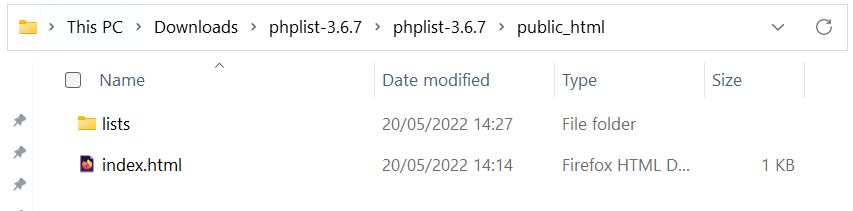
4. Agregar los accesos de la base de datos en el archivo /lists/config/config.php
// what is your Mysql database server hostname
$database_host = 'localhost';

// what is the name of the database we are using
$database_name = 'phplistdb';

// what user has access to this database
$database_user = 'phplist';

// and what is the password to login to control the database
$database_password = 'phplist';
5. Ejecutar la instalación ingresando a la dirección del sitio
http://dominio.com/lists/admin
Para mayor información contactar a servicio@rolosa.com


5 comentarios
jili77login · diciembre 3, 2025 a las 8:07 pm
Easy to log in to Jili77. No problems so far. Now, let’s get this bread! If you’re looking to log in, try this: jili77login
888game33 · diciembre 19, 2025 a las 7:01 pm
So, I was scrolling through and found 888game33. Seems like a solid platform with a great user interface. I’d say it’s worth a visit. Give it a try if you’re bored. Try out 888game33.
mexivergas · diciembre 19, 2025 a las 10:11 pm
Heard someone say mexivergas the other day. Had to google it! Now I’m in the know. You might find information about it here. mexivergas
98jili · enero 14, 2026 a las 3:42 am
98jili https://www.98jilig.com
okebet3 · enero 14, 2026 a las 7:37 am
okebet3 https://www.okebet3u.org