Resumen
Este articulo brinda una breve guia para instalar y activar el modulo o extension CURL en PHP 7.4
Detalles
IMPORTANTE: Como medidada de seguridad, se recomienda tener un respaldo o backup del servidor o su contenido.
Inicialmente es necesario contar con acceso SSH del servidor donde se va hacer la instalación.
1. Comando para instalar CURL
apt install libapache2-mod-php7.4 php7.4-curl
2. Editar el archivo php.ini en la ruta /etc/php/7.4/fpm/php.ini y descomentar la linea extension=curl quitando el ;
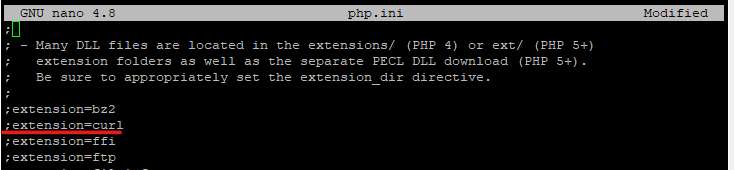
3. Reiniciar el servicio de apache
service apache2 restart
Para mayor información contactar a servicio@rolosa.com


7 comentarios
khelo247star · diciembre 3, 2025 a las 8:03 pm
Khelo247star is alright, I guess. It’s got a decent selection, but sometimes feels a bit clunky. Still, I keep coming back, so they must be doing something right! Maybe give them a try? khelo247star.
337jili · diciembre 19, 2025 a las 6:57 pm
Heard good things about 337jili. Lots of my friends down at the pub are playing, so I guess I will check it out to see what the buzz is about. Find out more : 337jili
betpkrgame · diciembre 19, 2025 a las 10:06 pm
Alright gamers, Betpkrgame is calling my name! The graphics are pretty sweet, and the gameplay seems solid. Totally hooked right now. Check it: betpkrgame
77jili · enero 14, 2026 a las 2:22 am
77jili https://www.77jilig.net
25phwinvip · enero 21, 2026 a las 11:33 pm
25phwinvip, the name sounds fancy and the site delivers! Great user experience and exciting games make it a solid choice. Feeling lucky?: 25phwinvip
linkvaom888 · enero 21, 2026 a las 11:33 pm
Linkvaom888 is the place to be. Gets you access quick fast and in a hurry! Check It Out: linkvaom888
telefonestartbet · enero 21, 2026 a las 11:34 pm
Telefonestartbet is super convenient. On my phone. On my time. Winning some small amounts. Give it a go: telefonestartbet